Descriptions are a Pro feature, paired with Captions. The free plugin doesn’t generate or edit them; with Image SEO Optimizer Pro active, a Description column appears in the image table directly after Caption, and clicking it opens this editor.
Pro-only feature Pro
Both Caption and Description editors require Pro. They edit WordPress’s native attachment fields, so anything saved here appears in Media Library → Edit attachment too.
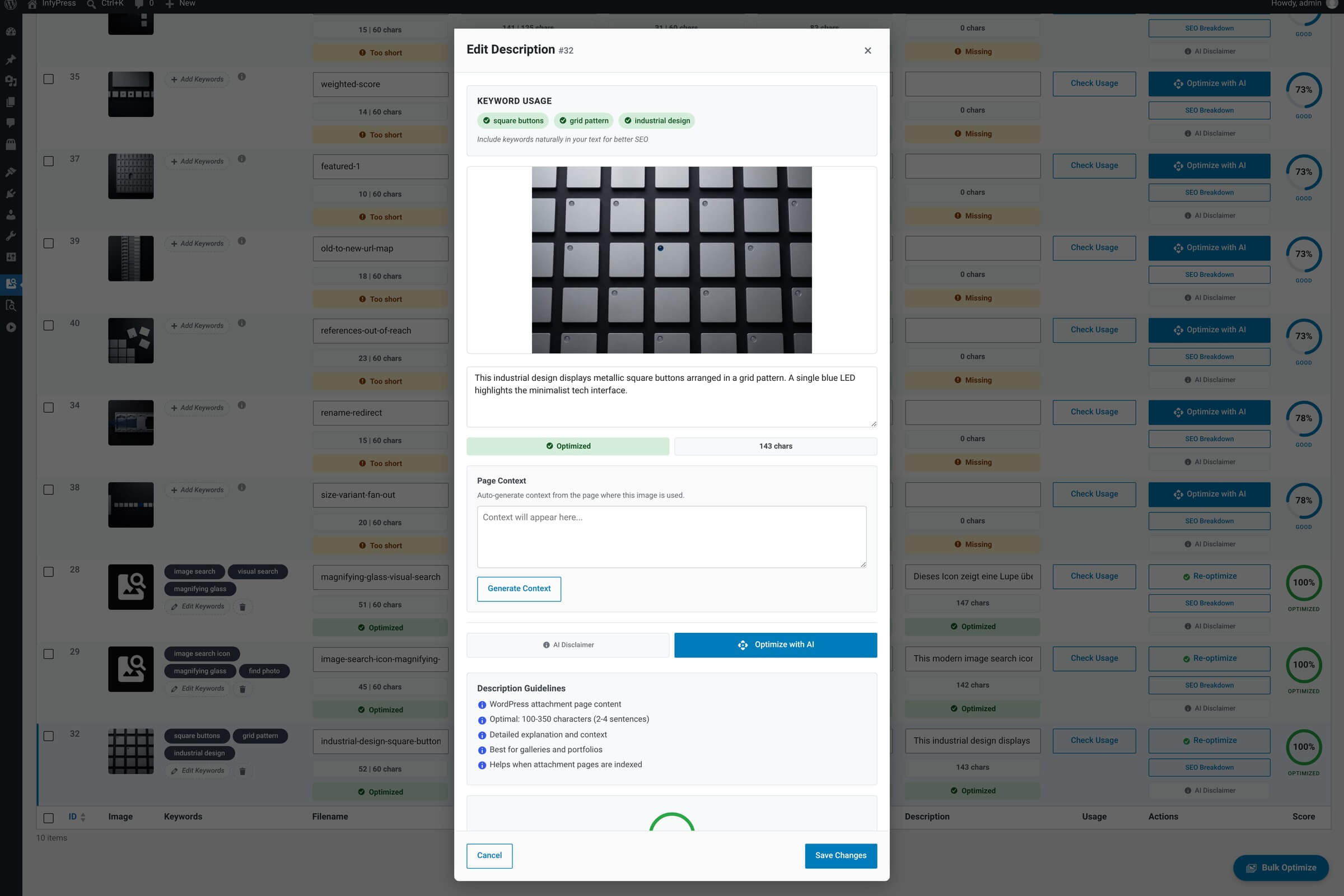
What it shows
Modal contents
| Feature | What it does |
|---|---|
| Image preview + ID badge Context. | Standard preview pattern, shared with every field editor in the plugin. |
| Description textarea Main input — taller than caption. | Longer, narrative copy. Descriptions appear on the attachment page WordPress generates per image, and in some lightbox plugins. Two to four sentences is a reasonable target. |
| Character counter Live count. | Tracks character length. Descriptions are usually longer than captions, so the counter helps you stay in a reasonable range. |
| Keyword chips Reference. | Read-only display of the saved keywords so you can weave them naturally into the description. |
| Optimize with AI Single-field AI suggestion. | Asks the AI to write two to four sentences of attachment-page copy. It runs on whatever the global AI Model dropdown is set to — a free model or a Pro one. Pro registers three extra models but sets no default of its own. |
| Save Changes / Cancel Persist or discard. | Save writes to WordPress’s standard description field (post_content on the attachment). Cancel discards. |
The modal is one entry point, not the only one. Since Pro 1.0.1 the same description write runs through the shared service — POST /wp-json/infyp/v1/images/{id}/field/description over REST, wp infyp optimize <id> --field=description on the command line, and a server-side job, which writes descriptions as part of a full optimization.
Where descriptions actually appear
WordPress renders the description on the auto-generated attachment page (your-site.com/?attachment_id=N), and many lightbox / gallery plugins surface it on click. If your theme hides attachment pages, descriptions are still indexed by search engines and read by rich-preview generators (Open Graph, Twitter Cards) when those fall back to attachment metadata.