Captions are a Pro feature. The free plugin doesn’t generate or edit them; with Image SEO Optimizer Pro active, a Caption column appears in the image table directly after Title, and clicking it opens this editor.
Pro-only feature Pro
If you don’t see a Caption column in the image table, you’re on the free plugin. Captions and Descriptions are the two AI-written fields Pro adds — both edit native WordPress fields, so anything saved here is visible in Media Library → Edit attachment too.
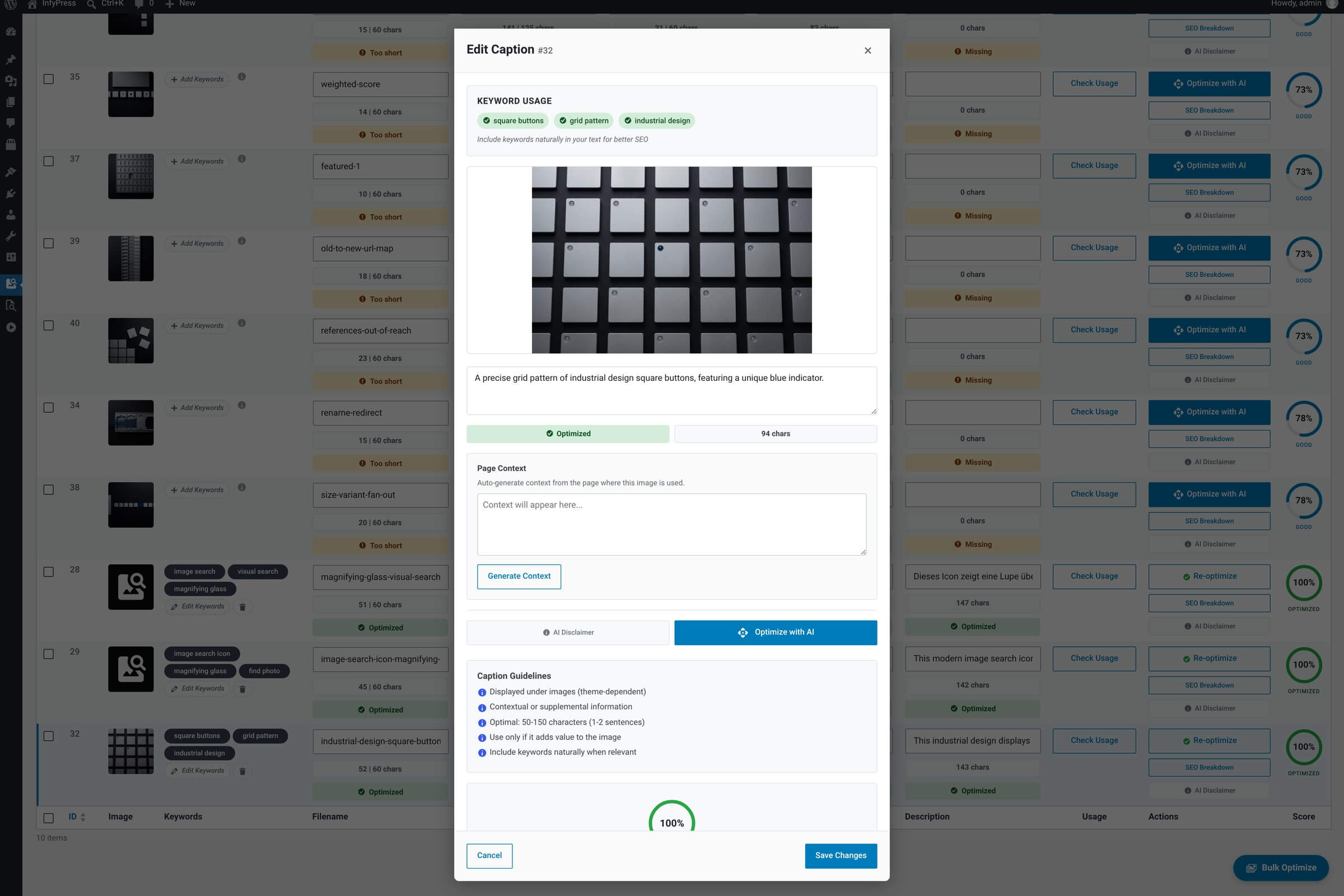
What it shows
Modal contents
| Feature | What it does |
|---|---|
| Image preview + ID badge Context. | Standard preview pattern shared with every other field editor in the plugin. |
| Caption textarea Main input. | Multi-line text field. Captions are shown beneath images by many themes and page builders, so a sentence or two — written for human readers — is usually right. |
| Character counter Live count. | Tracks character length as you type. Useful if your theme has a known caption limit. |
| Keyword chips Reference. | Read-only display of the image’s saved keywords — handy when writing the caption so you can weave them in naturally. |
| Optimize with AI Single-field AI suggestion. | Asks the AI to write a caption for this image, and asks for 50 to 100 characters. It runs on whatever the global AI Model dropdown is set to — a free model or a Pro one. Pro registers three extra models but sets no default of its own. |
| Save Changes / Cancel Persist or discard. | Save writes to WordPress’s standard caption field (post_excerpt on the attachment). Cancel discards. |
The modal is one entry point, not the only one. Since Pro 1.0.1 the same caption write runs through the shared service — POST /wp-json/infyp/v1/images/{id}/field/caption over REST, wp infyp optimize <id> --field=caption on the command line, and a server-side job, which writes captions as part of a full optimization.
Caption vs alt text — different jobs
Alt text describes the image for accessibility and search engines and is hidden in normal browsing. Caption is shown visibly to readers, often beneath the image. Many themes pull the caption into a small label below image blocks; alt text is invisible to sighted users. They’re different fields with different audiences.