Image SEO Optimizer registers its own REST namespace, infyp/v1, since version 1.0.6. This REST API reference covers every route, its parameters and the capability it demands, so you can list images, run an optimization, change the scoring configuration and — with Pro — queue server-side jobs from your own code.
Two plugins, one namespace
The free plugin registers the image, settings and scoring routes since 1.0.6. Pro 1.0.1 adds /jobs and /images/{id}/context to the same namespace through the infyp_rest_routes action — there is no separate Pro namespace and no second base URL to configure.
Namespace and authentication
Every route sits under https://example.com/wp-json/infyp/v1/. The namespace string lives in one place, the INFYP_REST_Controller::REST_NAMESPACE constant, and extensions are handed that string rather than hardcoding a copy of it.
Authentication is WordPress core’s, not the plugin’s. Use an Application Password for anything programmatic — create one under Users → Profile → Application Passwords — and cookie authentication with an X-WP-Nonce header for JavaScript running inside wp-admin.
curl -s -u "seo-bot:abcd EFGH ijkl MNOP qrst UVWX" \
  "https://example.com/wp-json/infyp/v1/images?per_page=20&orderby=modified&order=desc"
The plugin issues no tokens of its own and stores no credentials for the API. Both denials carry the code infyp_rest_forbidden: 401 when WordPress did not authenticate the request at all, 403 when it did and the user lacks the capability the route requires.
Capabilities and rate limits
Capabilities resolve through the action map in INFYP_Security_Manager, which the infyp_capability_map filter can change. Three short action names cover the free routes: optimize and edit_field map to upload_files, manage_settings maps to manage_options.
What each route requires
| Feature | Capability | Additional check |
|---|---|---|
| GET /images | upload_files | Callers without edit_others_posts see only their own uploads. |
| GET /images/{id} | edit_post on that image | 404 infyp_rest_invalid_image when the ID is not an attachment. |
| POST /images/{id}/optimize | upload_files plus edit_post on that image | The infyp_rest_optimize_permission filter can still veto the call. |
| POST /images/{id}/field/{field} | upload_files plus edit_post on that image | Field must be in the whitelist, or 400 rest_invalid_param. |
| GET and PATCH /settings | manage_options | None. Settings are site-wide. |
| GET, PATCH, PUT and DELETE /settings/scoring | manage_options | None. Scoring is site-wide. |
| /jobs routes (Pro) | edit_others_posts plus upload_files | Valid license, or 403 infyp_rest_license_required. |
| /images/{id}/context routes (Pro) | upload_files plus edit_post on that image | No license check on these three routes. |
The two optimize routes are counted against the same api_calls bucket the admin UI uses: 100 calls per hour, per user. Call 101 returns 429 with the error code infyp_rest_rate_limited. Read routes are not counted.
One bucket per user, not per application password
Counters are keyed by user ID, so every application password a user owns shares the same 100 calls per hour. Give each integration its own WordPress user if the budgets need to stay apart. infyp_rate_limits changes the ceiling and window; infyp_rate_limited_actions changes which actions are counted at all.
Image routes
Four routes cover the image resource: two reads and two writes. The writes call the same optimization service the Optimize with AI button uses, so extension field types registered through infyp_allowed_optimize_field_types work here without extra code.
Image routes
| Setting | Description |
|---|---|
GET /images
|
List images. 10 per page by default, 100 at most. Offset mode returns X-WP-Total and X-WP-TotalPages; both modes return Link headers for cursor navigation when the sort supports it. |
GET /images/{id}
|
One image with its stored SEO fields. Read-only: it never calls a provider and never writes post meta. |
POST /images/{id}/optimize
|
Full optimization in a single AI call — keywords, alt text, title and filename, including the file rename and the content references that point at it. |
POST /images/{id}/field/{field}
|
One field per call. The whitelist is filename, alt_text and title; Pro adds caption and description while its license is valid. |
Pagination has two modes. Offset mode is the default and behaves like every other WordPress collection. Cursor mode takes the opaque cursor value from a previous response’s Link header and stays constant-time at any depth, which is what makes it usable on a library of 50,000 images.
Collection parameters
| Setting | Default | Description |
|---|---|---|
page
|
1
|
Offset-mode page number. Ignored while a cursor is set. |
per_page
|
10
|
Items per page, 1 to 100. |
search
|
(empty)
|
Substring match on the image. Cursor mode is unavailable while a search is set. |
orderby
|
date
|
One of date, modified, id, title or seo_score. |
order
|
desc
|
asc or desc. |
cursor
|
(empty)
|
Opaque cursor from a previous response Link header. Total headers are omitted while it is set. |
context
|
view
|
Standard WordPress response context: view, edit or embed. |
Cursor mode carries three constraints. search must be empty, orderby must be date, modified or id, and no X-WP-Total or X-WP-TotalPages header comes back. Sorting by title or seo_score falls back to offset paging without telling you, so pass a supported sort when you rely on cursors.
{
  "id": 482,
  "date": "2026-05-14T09:12:03",
  "modified": "2026-08-02T11:40:55",
  "source_url": "https://example.com/wp-content/uploads/2026/05/harbor-crane-at-dawn.jpg",
  "mime_type": "image/jpeg",
  "filename": "harbor-crane-at-dawn",
  "title": "Harbor crane at dawn",
  "alt_text": "Red container crane above the quay, photographed against a pale sunrise",
  "caption": "",
  "description": "",
  "keywords": [
    "harbor crane",
    "container port",
    "sunrise"
  ],
  "keywords_manual": false,
  "optimized": true,
  "last_optimized": "2026-08-02 11:40:55",
  "seo_score": 86
}A read never computes a score
seo_score is the cached value from the _infyp_seo_score meta key and reads as null when an image has never been scored. A GET does not trigger the calculation, because calculating writes meta. The infyp_batch_cache_scores cron fills the gaps in the background instead.
Both write routes take the same body, and the field route adds one parameter of its own. Values are generated in a single AI call, which is why a request can take 10 to 60 seconds; the controller raises the PHP time limit to 120 seconds for the duration. With a Pro license a persisted optimize is three calls — the caption and the description are generated after the base fields are applied — while a dry_run stops before that and stays at one.
Body parameters on the optimize routes
| Setting | Default | Description |
|---|---|---|
custom_prompt
|
(empty)
|
Per-image prompt override, up to 1000 characters (filter infyp_max_prompt_length). Replaces the global prompt addon and any context filters for this one request. |
clear_keywords
|
false
|
Delete stored keywords first so the AI writes fresh ones. Ignored on the field route. |
dry_run
|
false
|
Return generated values without persisting anything. The provider still bills the call. |
options
|
{}
|
Free-form object forwarded to registered extensions. Unrecognized keys are ignored. |
keywords
|
the stored keywords
|
Field route only. Array of strings used as keyword context for this generation. |
A dry run is the safe way to see what a prompt change does to one image before you spend the call budget on a thousand of them.
curl -s -X POST -u "seo-bot:abcd EFGH ijkl MNOP qrst UVWX" \
  -H "Content-Type: application/json" \
  -d '{"custom_prompt":"Product photo. Name the material and the color.","dry_run":true}' \
  "https://example.com/wp-json/infyp/v1/images/482/optimize"
The response splits into what the AI produced and what the image looks like afterwards. On a dry run the second half is unchanged, which makes the two halves easy to diff before you commit to a real run.
{
  "optimization": {
    "new_data": {
      "alt_text": "Red container crane above the quay, photographed against a pale sunrise",
      "title": "Harbor crane at dawn",
      "filename": "harbor-crane-at-dawn",
      "keywords": [
        "harbor crane",
        "container port",
        "sunrise"
      ]
    },
    "model": "gemini-3.1-flash-lite-preview",
    "dry_run": true,
    "prompt_modified": false
  },
  "image": {
    "id": 482,
    "title": "Harbor crane at dawn",
    "seo_score": 86
  }
}
prompt_modified reports whether a callback on the infyp_optimize_prompt filter changed the prompt — Pro page context sets it to true — not whether you sent a custom_prompt yourself.
A dry run costs the same as a real one
dry_run skips persistence, not the AI call. The values are generated, your provider bills for them, and the request counts against the 100 per hour limit exactly like a saved optimization. It shows up in the activity log with the mode Dry run.
Settings routes
GET /settings returns what an API client needs before it sends anything: the active model, the output language, the field types the optimize routes accept, and the capabilities any installed extension advertises through infyp_rest_extensions.
{
  "ai_model": "gemini-3.1-flash-lite-preview",
  "connection_method": "api_keys",
  "wp_ai_ready": false,
  "language": "en_US",
  "prompt_addon": "",
  "per_image_prompt": false,
  "allowed_field_types": [
    "filename",
    "alt_text",
    "title"
  ],
  "max_keywords": 3,
  "max_custom_prompt_chars": 1000,
  "request_timeout": 60,
  "extensions": {}
}
PATCH /settings writes the handful of generation settings a client may reasonably switch between requests. Send at least one of them, or the request returns 400 with the code infyp_no_settings.
Writable through PATCH /settings
| Setting | Description |
|---|---|
ai_model
|
Any model ID the registry knows. Unknown IDs are rejected by the schema enum rather than stored. |
language
|
Any valid WordPress locale, checked against INFYP_Language_Manager. Invalid values return 400 rest_invalid_param. |
prompt_addon
|
Global prompt addon, up to 1000 characters. An empty string clears it. |
per_image_prompt
|
Whether the admin UI asks for per-image instructions before optimizing. |
request_timeout
|
Provider request timeout in seconds, 60 to 120. |
API keys are never writable over REST
No route reads, writes or tests a provider key, and connection_method is read-only in the response — switch between plugin API keys and WordPress AI Connectors on the API Keys screen. The same applies to license data: nothing about it is exposed here.
Scoring routes
The scoring configuration — the component weights and the per-field parameters every image is measured against — is readable and writable at /settings/scoring. Four methods, and the difference between two of them is the part worth reading twice.
Scoring methods
| Setting | Description |
|---|---|
GET /settings/scoring
|
The effective weights and parameters, an is_customized flag per member, and scores_stale_since. |
PATCH /settings/scoring
|
Merges the body onto the stored configuration. Keys you omit keep their current values. |
PUT /settings/scoring
|
Replaces the configuration. Members you omit fall back to the defaults, not to the stored values, so the result depends only on the request body. |
DELETE /settings/scoring
|
Restores the default weights and parameters. |
Both write methods validate the merged result, not the body, so a partial change cannot leave the stored configuration invalid. Weights that do not total exactly 100 are rejected and nothing is written — neither member is saved unless both pass.
curl -s -X PATCH -u "seo-bot:abcd EFGH ijkl MNOP qrst UVWX" \
  -H "Content-Type: application/json" \
  -d '{"weights":{"alt_presence":25,"alt_quality":10}}' \
  "https://example.com/wp-json/infyp/v1/settings/scoring"
The response is the full configuration after the merge, plus one extra member that only appears on writes.
{
  "weights": {
    "alt_presence": 25,
    "alt_quality": 10,
    "title_presence": 15,
    "title_quality": 10,
    "filename_quality": 15,
    "keyword_density": 15,
    "uniqueness": 10
  },
  "parameters": {
    "alt_text": {
      "min_chars": 50,
      "max_chars": 125,
      "tolerance_words": 1,
      "tolerance_chars_pct": 15
    }
  },
  "is_customized": {
    "weights": true,
    "parameters": false
  },
  "scores_stale_since": "2026-08-12 09:31:44",
  "scores_invalidated": 4127
}202 means the scores you read next are gone, not wrong
A successful write discards every cached SEO score and queues a background recalculation, then answers 202 with scores_invalidated counting what it threw away. It answers 200 when there was nothing cached to discard. The admin screen states the same thing: “Changing the scoring configuration discards every cached SEO score and queues a background recalculation. Scores read as empty until it completes.”
The REST API screen in wp-admin
Every optimization request that arrives over REST is logged, and the log has its own screen at Image SEO → REST API, directly after API Usage. The page slug is ai-image-seo-optimizer-rest-api and it requires manage_options.
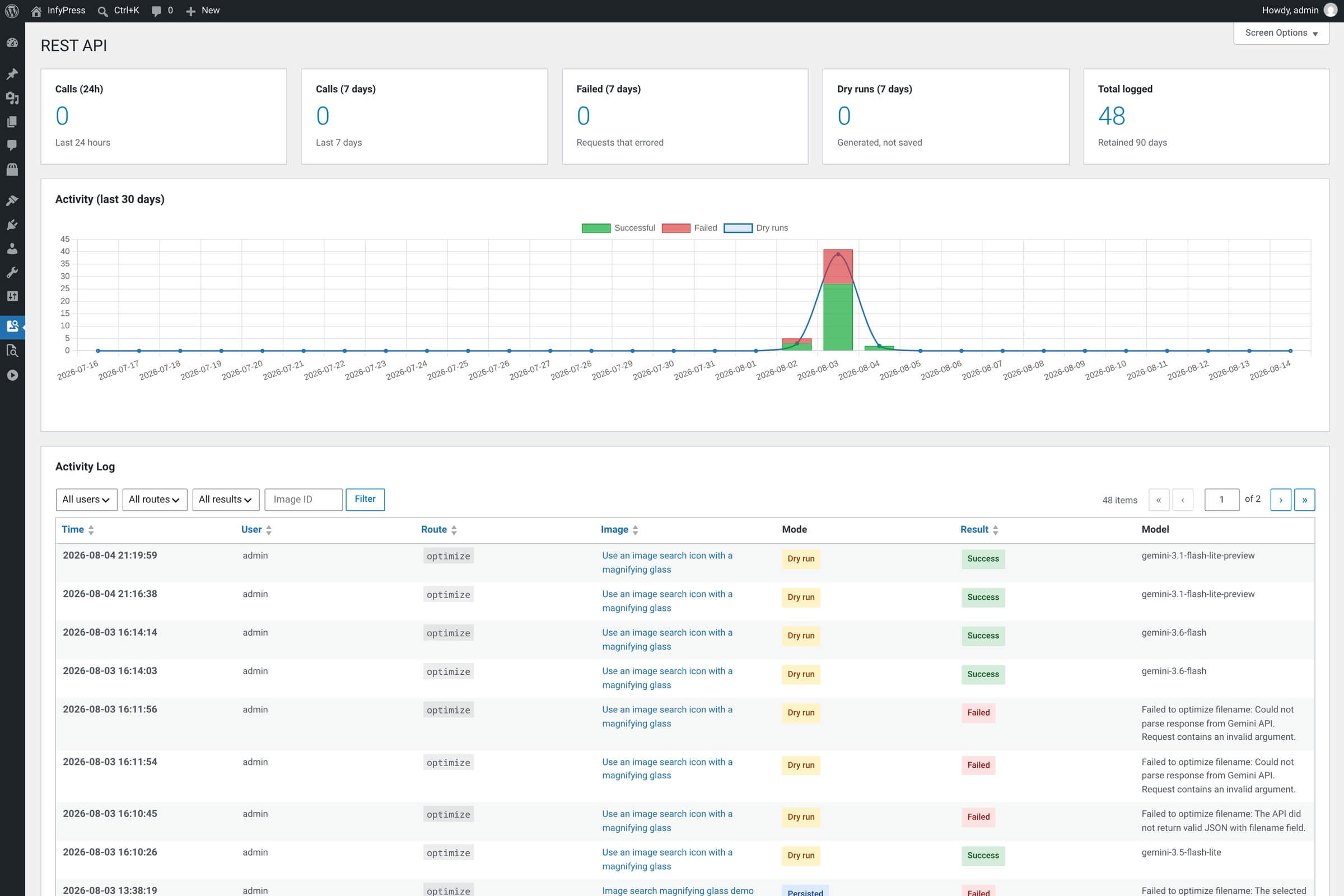
Five counters run across the top of the screen. All of them read from the same log table, so a number that looks wrong is a logging question, not a billing one.
The five counters
| Setting | Description |
|---|---|
Calls (24h)
|
Logged requests in the last 24 hours. |
Calls (7 days)
|
Logged requests in the last 7 days. |
Failed (7 days)
|
Requests that errored in the last 7 days. |
Dry runs (7 days)
|
Generated, not saved — billed all the same. |
Total logged
|
Every row currently in the table. Retained 90 days. |
Below the counters, Activity (last 30 days) plots three series — Successful, Failed and Dry runs. Under the chart, the Activity Log table lists Time, User, Route, Image, Mode, Result and Model, filterable by user, route, result and image ID. Mode reads Dry run or Persisted; the per-page screen option defaults to 25 rows.
Only writes are logged
Rows are written for the two optimize routes only, under the labels optimize and field:{type}. Reads, settings changes and scoring changes leave no entry. The table is {prefix}infyp_rest_log, entries older than 90 days are swept (filter infyp_rest_log_retention_days), and the table is dropped when you uninstall the plugin.
Server-side optimization jobs (Pro) Pro
Jobs move a bulk run off the browser and onto the server. You create one job, WordPress cron drives it in ticks, and progress is written after every image — so a crash, a deploy or a PHP timeout resumes where it stopped instead of starting over. These routes are Pro and need a valid license.
Job routes
| Setting | Description |
|---|---|
POST /jobs
Pro
|
Create and schedule a job. 201 with a Location header on success, 409 infyp_job_already_active when one is already pending or running, 400 infyp_job_empty when the set is empty. |
GET /jobs
Pro
|
The 20 most recent jobs, newest first. |
GET /jobs/{id}
Pro
|
One job, plus recent_failures: up to 20 entries of image_id, error and processed_at. |
DELETE /jobs/{id}
Pro
|
Cancel a pending or running job. 409 infyp_job_not_cancellable for anything else, 404 infyp_job_not_found for an unknown ID. |
POST /jobs/{id}/run
Pro
|
Run one batch synchronously. For sites with DISABLE_WP_CRON or an external scheduler. |
Creating a job is the only call that takes a body. Everything in it applies to every image the job touches, including the options object that extensions read.
POST /jobs body
| Setting | Default | Description |
|---|---|---|
filter
Pro
|
unoptimized
|
unoptimized or ids. Sending image_ids without naming a filter coerces it to ids, so a list of IDs can never silently queue the whole library. |
image_ids
Pro
|
none
|
Array of attachment IDs, used when filter is ids. |
custom_prompt
Pro
|
(empty)
|
Prompt override applied to every image in the job. |
clear_keywords
Pro
|
false
|
Clear stored keywords before optimizing each image. |
max_cost_usd
Pro
|
—
|
Halt the job once estimated spend reaches this amount. 0 means no budget. A positive value below 0.0001 is raised to 0.0001, the smallest the column stores. |
options
Pro
|
{}
|
Forwarded verbatim to registered extensions for every image in the job. |
A budget is the one parameter worth setting on a first run against an unfamiliar library.
curl -s -X POST -u "seo-bot:abcd EFGH ijkl MNOP qrst UVWX" \
  -H "Content-Type: application/json" \
  -d '{"filter":"unoptimized","max_cost_usd":5,"options":{"use_context":true}}' \
  "https://example.com/wp-json/infyp/v1/jobs"
Poll the job for progress. The single-job route adds recent_failures, which is usually enough to tell a bad batch of images from a provider outage.
{
  "id": 12,
  "status": "running",
  "filter": "unoptimized",
  "progress": {
    "total": 1000,
    "processed": 138,
    "succeeded": 134,
    "failed": 4
  },
  "cursor": 8421,
  "budget": {
    "max_cost_usd": 5.0,
    "spent_usd": 0.412137
  },
  "created_by": 3,
  "created_at": "2026-08-12 09:02:11",
  "started_at": "2026-08-12 09:02:41",
  "finished_at": "",
  "last_error": "",
  "recent_failures": [
    {
      "image_id": 8395,
      "error": "Invalid image ID.",
      "processed_at": "2026-08-12 09:05:02"
    }
  ]
}
The store defines six statuses. The first two are transient and the last four are terminal.
Job statuses
| Setting | Description |
|---|---|
pending
Pro
|
Created and scheduled; no tick has run yet. |
running
Pro
|
A tick is working through the images. |
completed
Pro
|
The image set was exhausted. |
cancelled
Pro
|
A DELETE reached it while it was pending or running. |
failed
Pro
|
Accepted by the store and listed in the schema, but per-image errors are counted in progress.failed instead — a job with failures still finishes as completed. |
halted
Pro
|
Estimated spend reached max_cost_usd. last_error carries the wording: Budget reached: estimated spend $X of $Y cap. Costs are estimates from blended per-token pricing. |
The published schema for the job resource lists five statuses and omits halted, and it describes no budget member either. Both are real: the store defines halted and every response carries budget with max_cost_usd and spent_usd. Write your client against the response, not the schema.
total is a progress denominator, not a contract
For filter=unoptimized the total is the count of never-optimized images at creation time, capped at 1000. The job is self-terminating and keeps going until the set is exhausted, so processed can pass total. Spend is measured from the recorded API usage rows per image, not predicted in advance, and the cap is therefore checked between images rather than before one.
One job runs at a time, site-wide. Each tick works for up to 20 seconds of wall clock, schedules the next one 30 seconds later, and stops early when free memory drops under 50 MB. A tick runs as the user who created the job, so filename renames keep that user’s capabilities rather than running as nobody.
Page context routes (Pro) Pro
Pro stores a short summary of the page an image appears on and can prepend it to the generation prompt. The summary lives in the _infyp_context_summary post meta key and has three routes of its own. These are Pro routes, though they are the one Pro area with no license check.
Context routes
| Setting | Description |
|---|---|
GET /images/{id}/context
Pro
|
The stored summary, or an empty string when none exists. |
POST /images/{id}/context
Pro
|
Generate a summary. Returns the stored one with cached: true and 200 unless refresh or dry_run is set; 201 when a new summary is stored, 200 when dry_run left it unstored. |
DELETE /images/{id}/context
Pro
|
Discard the stored summary. Returns image_id, deleted: true and an empty summary. |
Only the POST takes a body, and all three of its parameters are about where the text comes from and whether the result is kept.
POST body
| Setting | Default | Description |
|---|---|---|
post_id
Pro
|
—
|
Post to summarize. 0 picks one of the posts the image appears on, chosen at random — pass a specific ID from source_posts when that matters. |
refresh
Pro
|
false
|
Regenerate even when a summary is already stored. |
dry_run
Pro
|
false
|
Generate without storing the result. |
source_posts lists every post the image is used on, with taxonomy-term usages left out, so a client can offer a choice instead of accepting the random pick.
{
  "image_id": 482,
  "summary": "The page reviews three container cranes and compares their lifting capacity.",
  "has_context": true,
  "source_post": 119,
  "source_posts": [
    119,
    204
  ],
  "cached": false,
  "dry_run": false
}
To use a summary during an optimization, set options.use_context to true on the optimize routes or on POST /jobs, which forwards options verbatim and so makes an entire job context-aware. A stored summary is reused; otherwise one is generated, unless you also set options.generate_context to false. The summary is prepended to your custom_prompt.
With Pro active, every image resource gains context_summary and has_context, and GET /settings advertises the extension so a client can discover it without hardcoding: extensions.context carries the label Page context, the option keys use_context and generate_context, and the route images/{id}/context.
Generating context is a second AI call
Each summary costs one extra request to your provider on top of the optimization itself, and nothing is stored during a dry run. A missing summary is never fatal — generation continues without it. An image that appears on no post returns 404 infyp_context_no_source, and a page whose text cannot be read returns 422 infyp_context_extract_failed.
Extending the namespace
Extensions register on the shared namespace instead of adding one of their own. The infyp_rest_routes action passes the namespace string and nothing else — no controller instance, no internals — which is exactly how Pro adds /jobs and the context routes.
add_action( 'infyp_rest_routes', function ( $rest_namespace ) {
    register_rest_route(
        $rest_namespace,
        '/images/(?P<id>[\d]+)/publish-check',
        [
            'methods'             => 'GET',
            'permission_callback' => function ( $request ) {
                return current_user_can( 'edit_post', (int) $request['id'] );
            },
            'callback'            => function ( $request ) {
                $image_id = (int) $request['id'];

                return rest_ensure_response( [
                    'image_id' => $image_id,
                    'has_alt'  => '' !== (string) get_post_meta( $image_id, '_wp_attachment_image_alt', true ),
                ] );
            },
        ]
    );
} );
Beyond registering routes, a set of hooks changes what the existing ones do. Every name and signature below is the one shipping in 1.0.6.
REST extension points
| Setting | Description |
|---|---|
infyp_rest_routes (action)
|
Fires after the plugin registers its routes. Parameters: $rest_namespace (string, infyp/v1). |
infyp_rest_optimize_permission (filter)
|
Veto or narrow an optimize call. Parameters: $allowed (true|WP_Error), $request, $field (string|null). |
infyp_rest_images_query_args (filter)
|
Change the query behind GET /images. Parameters: $args (array), $request. |
infyp_rest_images_collection (filter)
|
Change the prepared collection before it is returned. Parameters: $items (array), $request. |
infyp_rest_image_response (filter)
|
Add fields to a single image resource. Parameters: $data (array), $image_id (int), $request. Pro uses it for context_summary and has_context. |
infyp_rest_after_optimize (action)
|
Fires after a successful optimization on either write route. Parameters: $image_id (int), $result (array), $request. |
infyp_rest_settings_response (filter)
|
Add to the settings payload. Parameters: $settings (array). |
infyp_rest_extensions (filter)
|
Advertise a capability under extensions on GET /settings. Parameters: $extensions (array keyed by slug). |
infyp_rest_scoring_pre_save (filter)
|
Adjust the merged scoring configuration before it is validated. Parameters: $config (array with weights and parameters), $request. |
infyp_rest_scoring_updated (action)
|
Fires after a scoring write or reset. Parameters: $config (array), $invalidated (int), $request. |
infyp_rest_scoring_response (filter)
|
Change the scoring payload. Parameters: $payload (array). |
infyp_rest_admin_page_sections (action)
|
Append a section to the REST API admin screen. No parameters. Pro renders the jobs monitor here. |
infyp_rest_log_retention_days (filter)
|
Change how long activity rows are kept. Parameters: $days (int, default 90; values below 1 are clamped up). |
infyp_allowed_optimize_field_types (filter)
|
Add a field type to the field route whitelist. Parameters: $types (array, default filename, alt_text, title). |
infyp_max_prompt_length (filter)
|
Change the custom_prompt and prompt_addon ceiling. Parameters: $length (int, default 1000). |
infyp_capability_map / infyp_rate_limits / infyp_rate_limited_actions (filters)
|
Change which capability a route action maps to, the 100 per hour ceiling, and which actions are counted. |
Two of these are worth a warning. infyp_rest_optimize_permission runs after the built-in checks, so it can only tighten access, never widen it. infyp_rest_image_response runs on every item of a 100-image collection, so keep it away from per-image queries.
Next steps
The REST routes are one of three extension surfaces. The PHP helpers do the same work in-process, and WP-CLI drives the same jobs from a shell.
Public API
The helper functions behind these routes — query images, optimize a field, log a change, track usage.
WP-CLI commands
wp infyp optimize, status and job — the same jobs as POST /jobs, driven from a shell. Pro.
Actions reference
Every do_action() the plugin fires, including the REST lifecycle hooks.
Filters reference
Every apply_filters() the plugin exposes — queries, prompts, capabilities, rate limits.
Using WordPress AI Connectors
Run the same routes without a plugin API key on WordPress 7.0 and later.