Image SEO Optimizer
Auto-optimize Filenames, Alt Text, Titles, Caption and Description for your entire WordPress media library. Boost your AI and search engine rankings with best practice image SEO.
Built for Thousands of WP Sites Worldwide
Complete SEO automation for images AND content — let AI handle the optimization while you focus on growing your business
Digital Agencies
Managing dozens of client websites becomes effortless when AI handles your WordPress SEO, letting you deliver optimized sites faster.
E-commerce Stores
Your WooCommerce products deserve to be found. Boost organic traffic and sales with AI-optimized images and meta content.
Photographers
Showcase your visual artistry while climbing Google Images rankings. Every portfolio piece becomes searchable with smart optimization.
Content Publishers
Turn your blog posts into search engine magnets. AI generates compelling meta descriptions that boost click-through rates.
Educators & Bloggers
Focus on creating valuable content. Let AI handle the technical SEO work so your knowledge reaches more readers.
Enterprises
Scale your WordPress multisite network confidently. Maintain brand consistency and SEO excellence across hundreds of sites with centralized AI optimization.
Complete Image SEO Optimization
All the features you need to optimize images following Google’s best practices for search visibility
Core Image SEO Fields
Optimize the most important fields: Filename, Alt Text, and Title — the core metadata that directly impacts search rankings and accessibility.
AI Keyword Generation
Automatically generate relevant keywords for your images and manually edit them to perfectly align with your content strategy.
AI Models Included
Choose from industry-leading AI models with custom prompts to fine-tune responses for your needs.
Single Image Optimization
Optimize images one at a time directly from your WordPress media library with AI-powered SEO for precise, high-quality results.
WooCommerce & CPT Support
Full support for WooCommerce product images, galleries, variations, and all Custom Post Types — optimize any content structure out of the box.
Multiple Languages
Generate optimized metadata in English, Spanish, French, German, and more for multilingual websites and global reach.
Automatic 301 Redirects
Renamed images including all thumbnails are automatically 301 redirected to prevent broken links and preserve your existing search rankings.
Search Console API
Track page rankings where your images are used with direct Google Search Console integration. Monitor SEO performance and measure optimization impact.
Custom SEO Scoring
View real-time SEO scores for each image with adjustable scoring parameters to understand optimization quality and measure impact.
Post Type Filter
Optimize images per post type: Media Library, Posts, and Pages — target specific content areas for efficient optimization workflows.
Manual Editing
Preview and manually refine all AI-generated metadata before applying changes, ensuring complete control over your image SEO.
API Usage Dashboard
Keep complete API cost overview with detailed usage tracking and analytics to monitor spending and optimize budget.
Regular Updates
Automatic updates with new features, AI model improvements, security patches, and detailed changelogs for full transparency.
Optimization Changelog
See exactly what changed — before and after every optimization with comprehensive tracking for full transparency.
Everything from Free
Pro builds on our powerful free foundation with all core optimization features included.
Bulk Optimization
Process 10,000+ images at once with intelligent queuing. Ideal for WooCommerce stores and large websites with massive media libraries.
Premium AI Models
Access the most advanced AI models for superior optimization results.
Real-time Upload Optimization
Automatically optimize images the moment they are uploaded to WordPress. No manual intervention needed — every image gets SEO-ready instantly.
Caption & Description
Creates compelling captions and detailed descriptions. Captions are read 300% more than body copy — ideal for galleries, lightboxes, and search indexing.
Image Context Generation
AI analyzes the content where each image is used across your entire website, providing exact position and context awareness for finer optimization.
Advanced Post Type Filter
Filter and optimize images across all post types including WooCommerce Products, ACF, and custom taxonomies.
PageBuilder Support
Full compatibility with Elementor, Divi, Beaver Builder, WPBakery, and Gutenberg — optimize images wherever they appear.
Three Steps to Optimized Images
From installation to fully optimized images in minutes
Install & Connect
Install the plugin from WordPress.org and connect your AI API key. Choose your preferred AI model and optimization settings.
Select & Configure
Pick which image fields to optimize: filenames, alt text, titles, captions, or descriptions. Set your language and tone preferences.
Optimize & Rank
Run bulk optimization or let the plugin auto-optimize on upload. Watch your image search rankings improve as AI handles the rest.
Simple, Transparent Pricing
Choose the plan that fits your needs
Single-site license – ideal for personal blogs or small websites.
Unlimited Sites – ideal for digital agencies and corporations.
Detailed Feature Comparison
See exactly what you get with each plan
| Feature | Free | Personal | Freelancer | Agency |
|---|---|---|---|---|
| Licensing & Support | ||||
| Number of Sites | 1 Site | 1 Site | 10 Sites | Unlimited Sites |
| Support | Community | Standard | Priority | White-glove |
| Updates | Lifetime | 1 Year / Lifetime | 1 Year / Lifetime | 1 Year / Lifetime |
| Core Features | ||||
| Single Image Optimization | check_circle | check_circle | check_circle | check_circle |
| Bulk Optimization | remove_circle_outline | check_circle | check_circle | check_circle |
| Image Context Generation | remove_circle_outline | check_circle | check_circle | check_circle |
| Real-time Upload Optimization | remove_circle_outline | check_circle | check_circle | check_circle |
| Maximum Images | Unlimited | Unlimited | Unlimited | Unlimited |
| SEO Optimization | ||||
| Keyword Generation | check_circle | check_circle | check_circle | check_circle |
| Filename Optimization | check_circle | check_circle | check_circle | check_circle |
| Alt Text Generation | check_circle | check_circle | check_circle | check_circle |
| Title Text Generation | check_circle | check_circle | check_circle | check_circle |
| Caption Generation | remove_circle_outline | check_circle | check_circle | check_circle |
| Description Generation | remove_circle_outline | check_circle | check_circle | check_circle |
| SEO Score Analysis | check_circle | check_circle | check_circle | check_circle |
| Custom SEO Settings | check_circle | check_circle | check_circle | check_circle |
| AI Models | ||||
| Gemini 3.1 Flash-Lite | check_circle | check_circle | check_circle | check_circle |
| Gemini 3.1 Pro | remove_circle_outline | check_circle | check_circle | check_circle |
| GPT-4.1 mini | check_circle | check_circle | check_circle | check_circle |
| GPT-5 mini | remove_circle_outline | check_circle | check_circle | check_circle |
| Claude 4.5 Haiku | check_circle | check_circle | check_circle | check_circle |
| Claude 4.5 Sonnet | remove_circle_outline | check_circle | check_circle | check_circle |
| Page Builder Support | ||||
| Gutenberg (Block Editor) | check_circle | check_circle | check_circle | check_circle |
| Elementor | check_circle | check_circle | check_circle | check_circle |
| WPBakery | check_circle | check_circle | check_circle | check_circle |
| Uncode | check_circle | check_circle | check_circle | check_circle |
| Visual Composer | check_circle | check_circle | check_circle | check_circle |
| Divi Builder | check_circle | check_circle | check_circle | check_circle |
| Advanced Features | ||||
| API Usage Dashboard | check_circle | check_circle | check_circle | check_circle |
| Woo (WooCommerce) Support | check_circle | check_circle | check_circle | check_circle |
| Custom Post Type Support | check_circle | check_circle | check_circle | check_circle |
| Get Free | Get Personal | Get Freelancer | Get Agency | |
See Image SEO Optimizer in Action
Explore the intuitive interfaces and powerful features that make our AI-powered SEO tools stand out
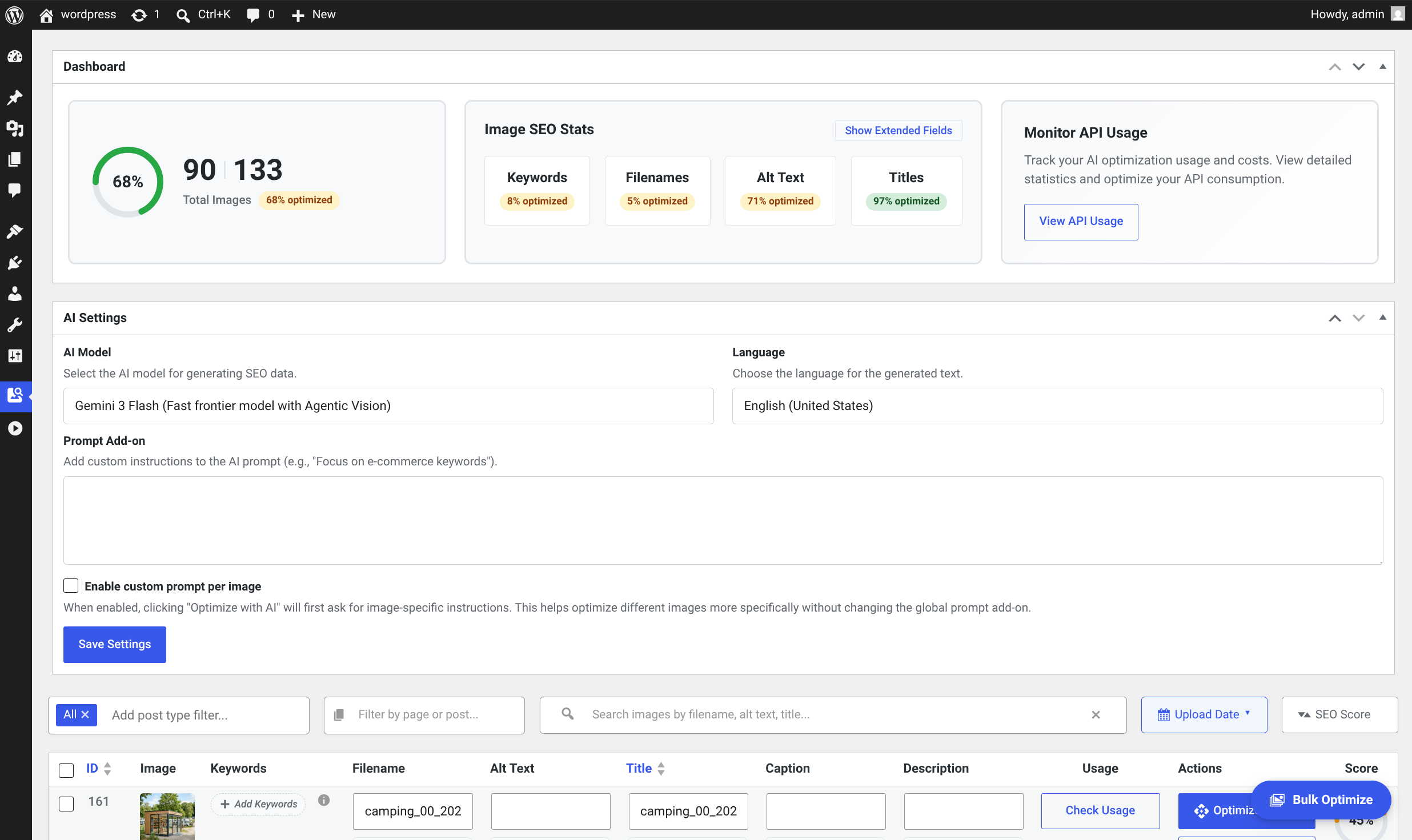
Detailed Image Stats & AI Settings
Get a complete overview of your WordPress image SEO progress alongside powerful global AI configurations. Monitor your site’s optimization health, track API consumption, and localize your generated content effortlessly.
- check_circle View real-time optimization percentages for all images
- check_circle Track optimization costs and limits
- check_circle Set a global language for the AI-generated metadata
- check_circle Choose cutting-edge AI models and define custom prompt add-ons
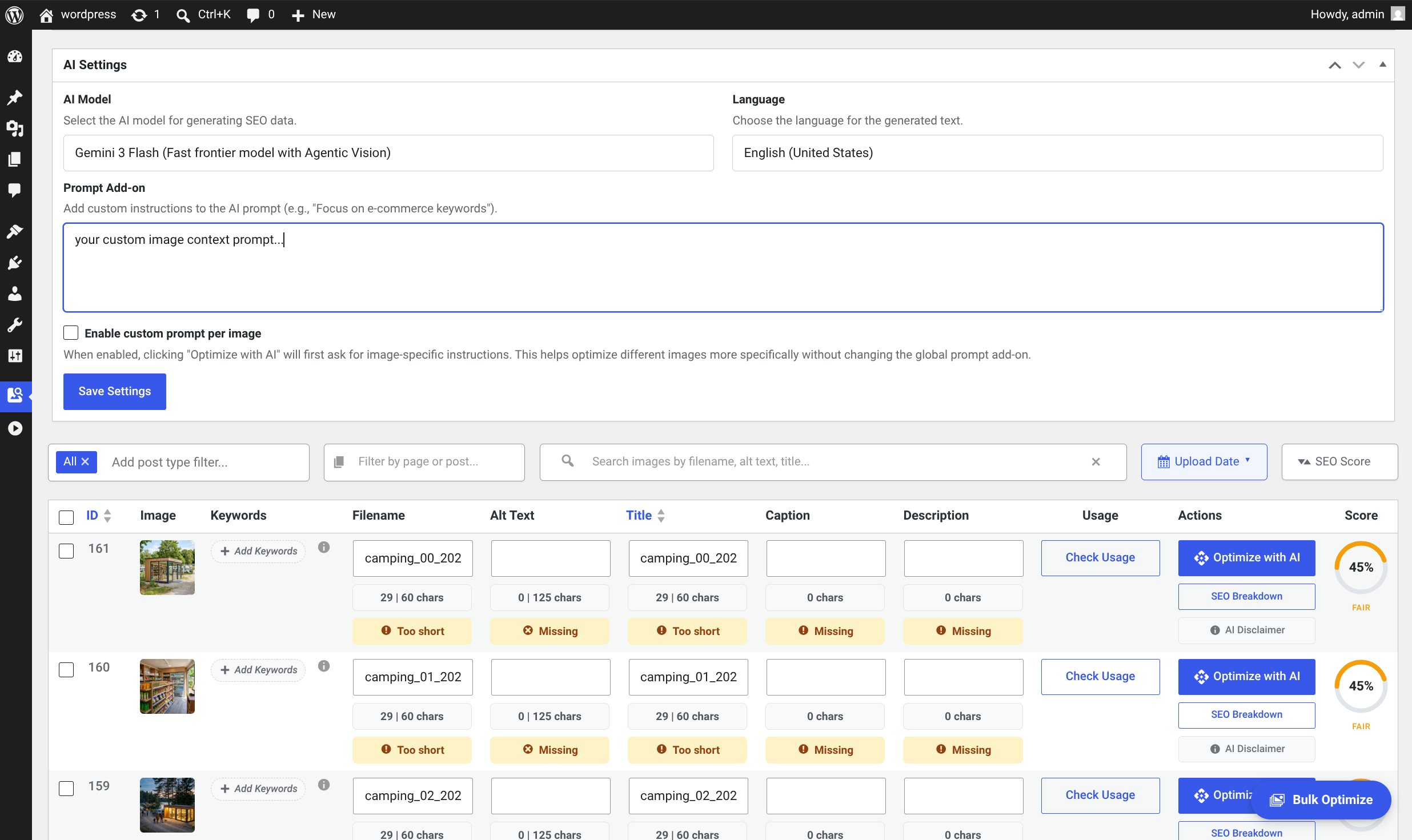
Custom AI Prompts & Advanced Image Filtering
Take full control of your image SEO workflow with powerful filtering and highly customizable AI context. Easily sort through your media library by specific post types and seamlessly switch between automated AI generation and manual inline editing.
- check_circle Apply custom AI prompts globally or per-image
- check_circle Filter your library by pages, posts, Woo Products or Custom Post Types
- check_circle View critical SEO metadata, character counts, and real-time scores
- check_circle Make manual, inline edits to all image fields
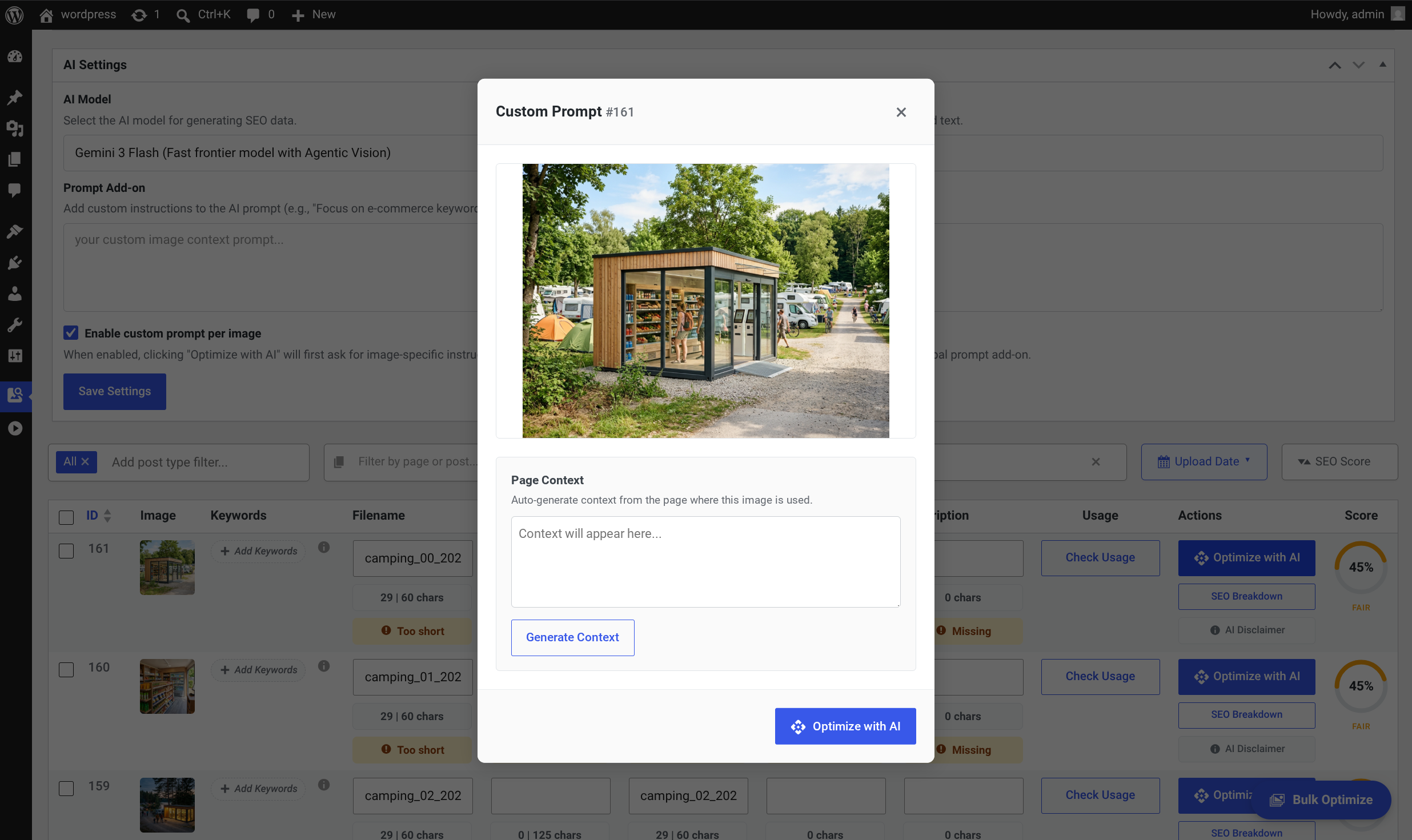
Per-Image Context Generation
Ensure hyper-relevant AI outputs by providing specific instructions for individual images. This focused modal allows you to review the visual asset and automatically inject surrounding page context before generating metadata.
- check_circle Preview the exact image being optimized for accurate, visual confirmation.
- check_circle Automatically pull text from the image’s parent post or page.
- check_circle Type manual instructions into the prompt box to guide the AI
- check_circle Execute the AI optimization instantly directly from the modal
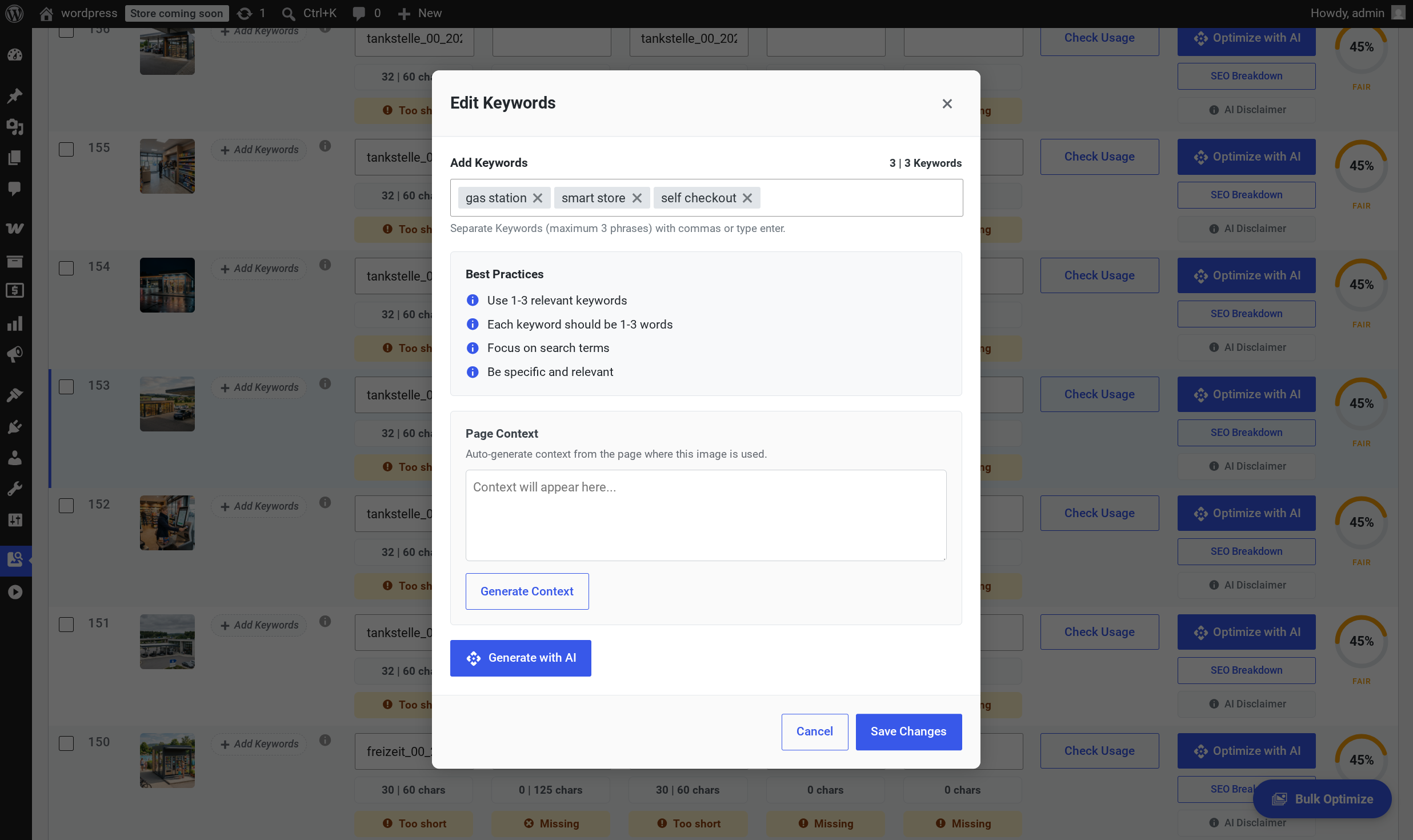
Strategic Image Keyword Targeting
Optimize your images for specific search intents using the dedicated keyword editing modal. Easily define your own target phrases or leverage intelligent AI and page context to generate high-performing SEO keywords automatically.
- check_circle Add up to three distinct focus keywords per image
- check_circle Adhere to built-in SEO best practices with on-screen guidance
- check_circle Automatically pull context from the parent page
- check_circle Instantly brainstorm and apply targeted search phrases
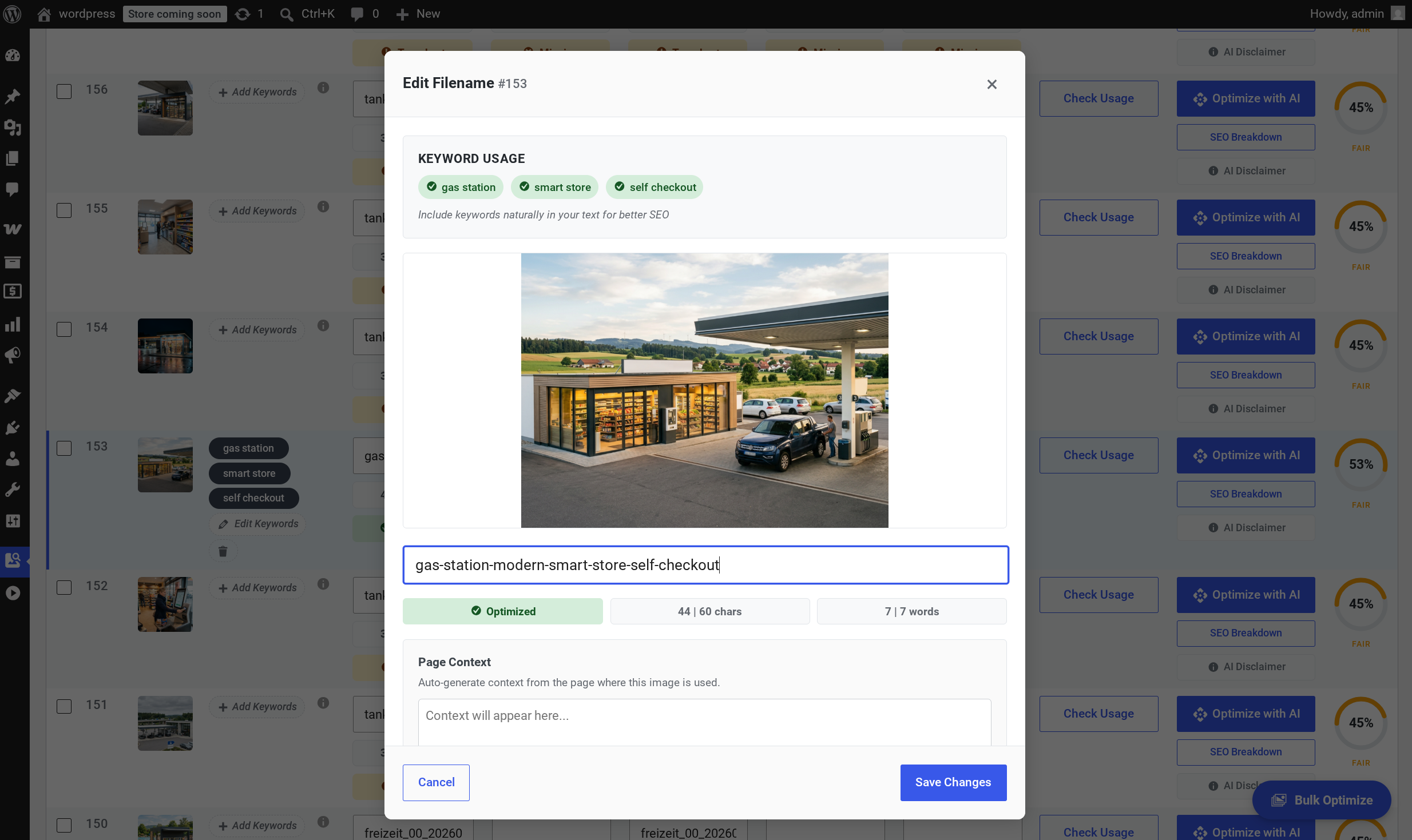
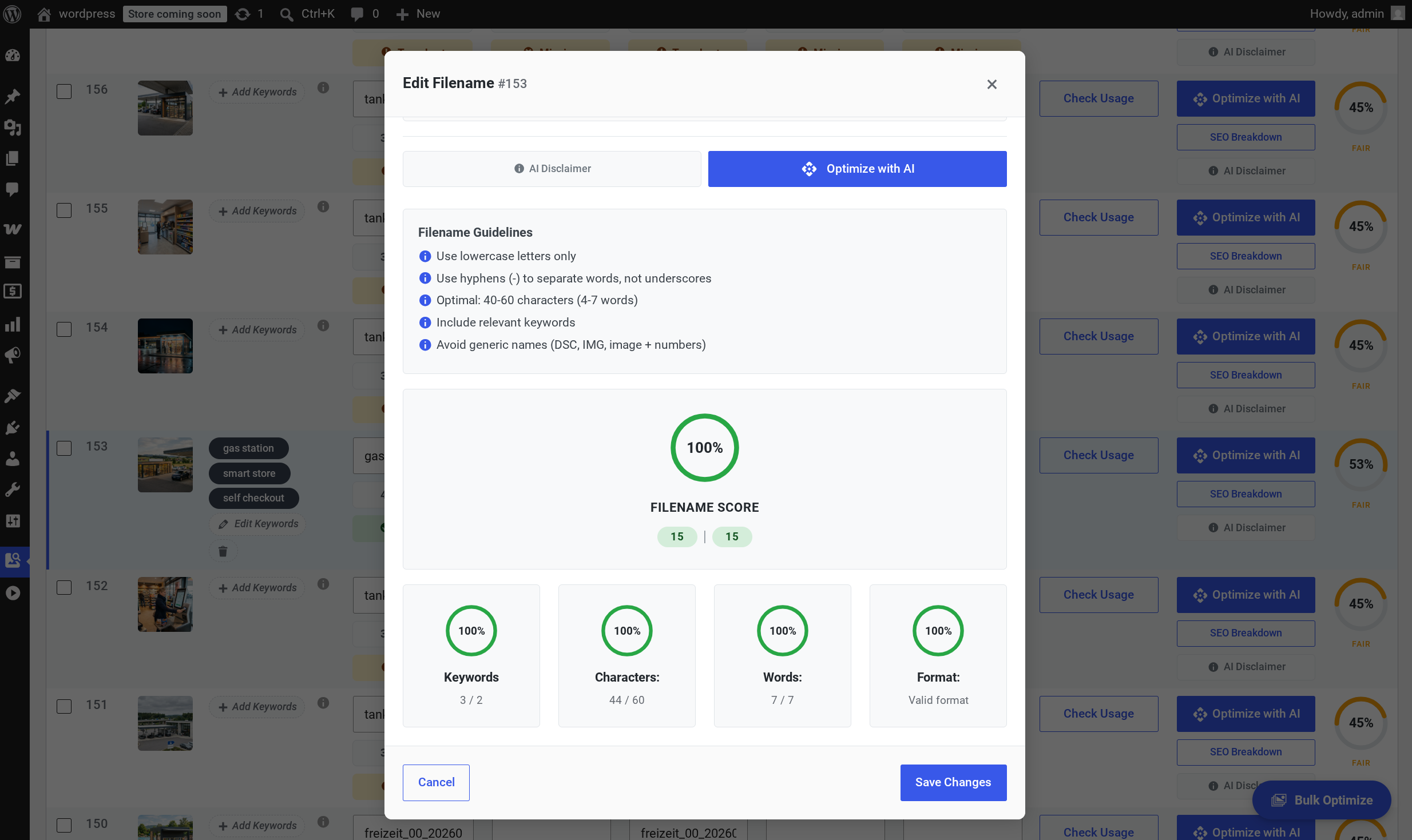
Smart Image Filename Editor
Craft perfectly optimized image filenames with real-time feedback. The dedicated filename editor ensures your assets follow strict SEO best practices while seamlessly integrating your target keywords.
- check_circle Monitor keyword usage with dynamic badges
- check_circle Track character and word counts in real-time
- check_circle Preview the visual asset directly within the modal
- check_circle Utilize auto-generated page context
Powered by Industry-Leading AI
Choose from the most advanced AI models for both image and content optimization
Gemini 3.1 Flash-Lite
Google’s fastest multimodal AI optimized for quick analysis. Delivers accurate results with exceptional speed and efficiency for everyday SEO needs.
Claude 4.5 Haiku
Anthropic’s fastest AI with vision capabilities. Known for precise, character-limit-respecting descriptions — ideal for accessibility-compliant alt text.
GPT-4.1 mini
OpenAI’s efficient vision model with excellent quality at a fraction of the cost. Delivers accurate, concise alt text and descriptions.
Gemini 3.1 Pro
Google’s most advanced multimodal AI with superior reasoning. Provides deeply detailed understanding and complex contextual analysis.
Claude 4.5 Sonnet
Anthropic’s most capable Sonnet model with Constitutional AI guardrails. Delivers nuanced, accurate descriptions with fine detail capture.
GPT-5 mini
OpenAI’s cost-efficient reasoning model optimized for structured tasks. Delivers GPT-5-level image understanding at a fraction of the cost.
Tested & Optimized for Excellence.
We rigorously tested and selected the best models from each AI provider specifically for image analysis and SEO data generation. Through thousands of image tests, we’ve identified the perfect combination where cutting-edge image processing meets large language model capabilities to deliver exceptional metadata quality — and we update our model selection frequently to ensure you always get the best results.
Everything You Need to Increase Image Rankings
Powerful AI-driven features that automate image optimization and drive more organic traffic
Image Filename Optimization
Automatically converts generic filenames like IMG_1234.jpg into descriptive, keyword-rich slugs like blue-running-shoe.jpg, giving search engines a powerful first clue about the image’s content.
Alt Text Optimization
Generates precise, descriptive alt text for every image, ensuring compliance with web accessibility (WCAG) standards and providing critical context that helps search engines understand and rank your images.
Title Text Optimization
Optimizes the image title attribute to provide supplementary information, which creates a helpful tooltip when a user hovers over the image and can offer additional context to assistive technologies.
Caption Optimization
Creates compelling captions that appear beneath your images, capturing reader attention and naturally incorporating relevant keywords. Captions are read 300% more than body copy.
Description Optimization
Generates detailed image descriptions with specifications, features, and context. Ideal for galleries, lightboxes, and search indexing.
SEO Scoring System
Our scoring system evaluates images based on Google’s SEO best practices. Each component contributes to a total score of 100 points. The scoring weights are fully adjustable in the WordPress backend.
Most important for accessibility & SEO. Optimal: 50-125 chars (10-16 words)
Optional tooltip text. Optimal: 40-60 chars (6-10 words)
SEO-friendly format with hyphens. Optimal: 40-60 chars (3-6 words)
Keywords in alt, title, and filename. Improves SEO relevance
Non-duplicate content. Avoids SEO penalties
How We Score Every Image
Every attribute is evaluated against three criteria. The final score is the weighted sum of presence + quality minus any penalties.
Presence
Base points
Each attribute earns a base score just for being set. Empty alt text, empty title, or a generic filename all score zero on this criterion — starting from a clean baseline.
- Alt text filled in
- Title attribute set
- Descriptive filename
- Caption & description
Quality
Length & relevance
Points scale with optimal length, natural-language description, and keyword relevance. Short, descriptive metadata written for humans scores highest — matching Google’s “people-first” guidance.
- 50–125 char alt text
- Target keyword present
- Hyphen-separated filename
- Natural phrasing
Penalties
Deductions
Common SEO anti-patterns reduce the final score. Keyword stuffing, generic camera filenames, “image of” prefixes, and duplicate content across multiple images all trigger deductions.
- Keyword stuffing
- IMG_0001 style names
- "Image of" prefixes
- Duplicate alt across images
See Our SEO Scoring in Action
Explore the intuitive interfaces and powerful features that make our AI-powered SEO tools stand out
In-Depth Filename Analysis
Ensure your image filenames are perfectly structured for search engines with a comprehensive SEO scoring view. Instantly identify areas for improvement using strict formatting guidelines and granular metric breakdowns.
- check_circle Review clear, actionable filename guidelines
- check_circle Gauge overall optimization health instantly
- check_circle Analyze specific breakdown metrics including keyword inclusion
- check_circle Automatically rewrite underperforming filenames
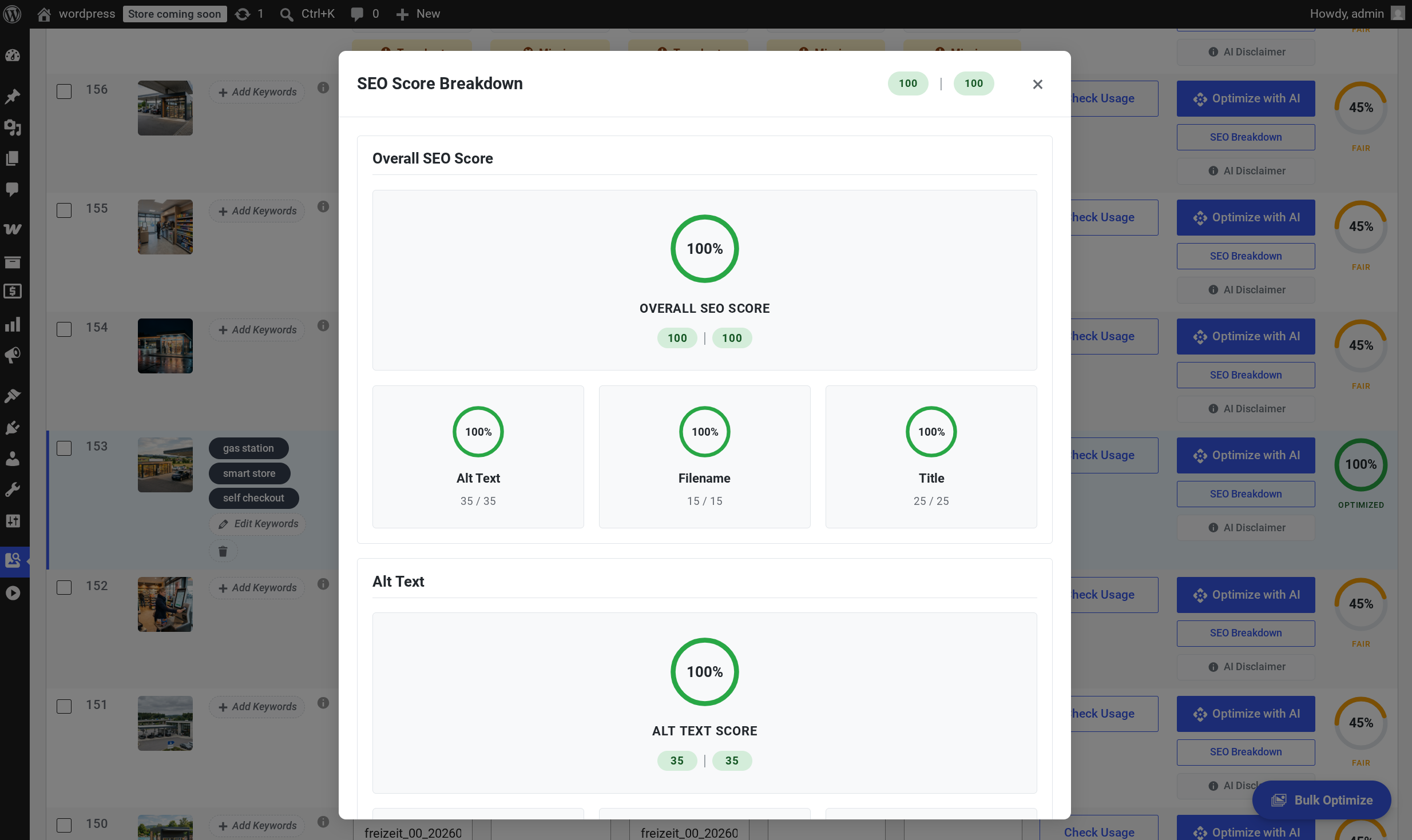
Unified Image Optimization Scoring
Get a transparent, high-level view of your image’s complete optimization status. The comprehensive SEO Score Breakdown modal reveals exactly how individual metadata fields contribute to your asset’s overall health.
- check_circle View a prominent Overall SEO Score
- check_circle Analyze individual weighted point contributions
- check_circle Access detailed, per-field metric breakdowns
- check_circle Ensure perfectly balanced, fully SEO-compliant metadata
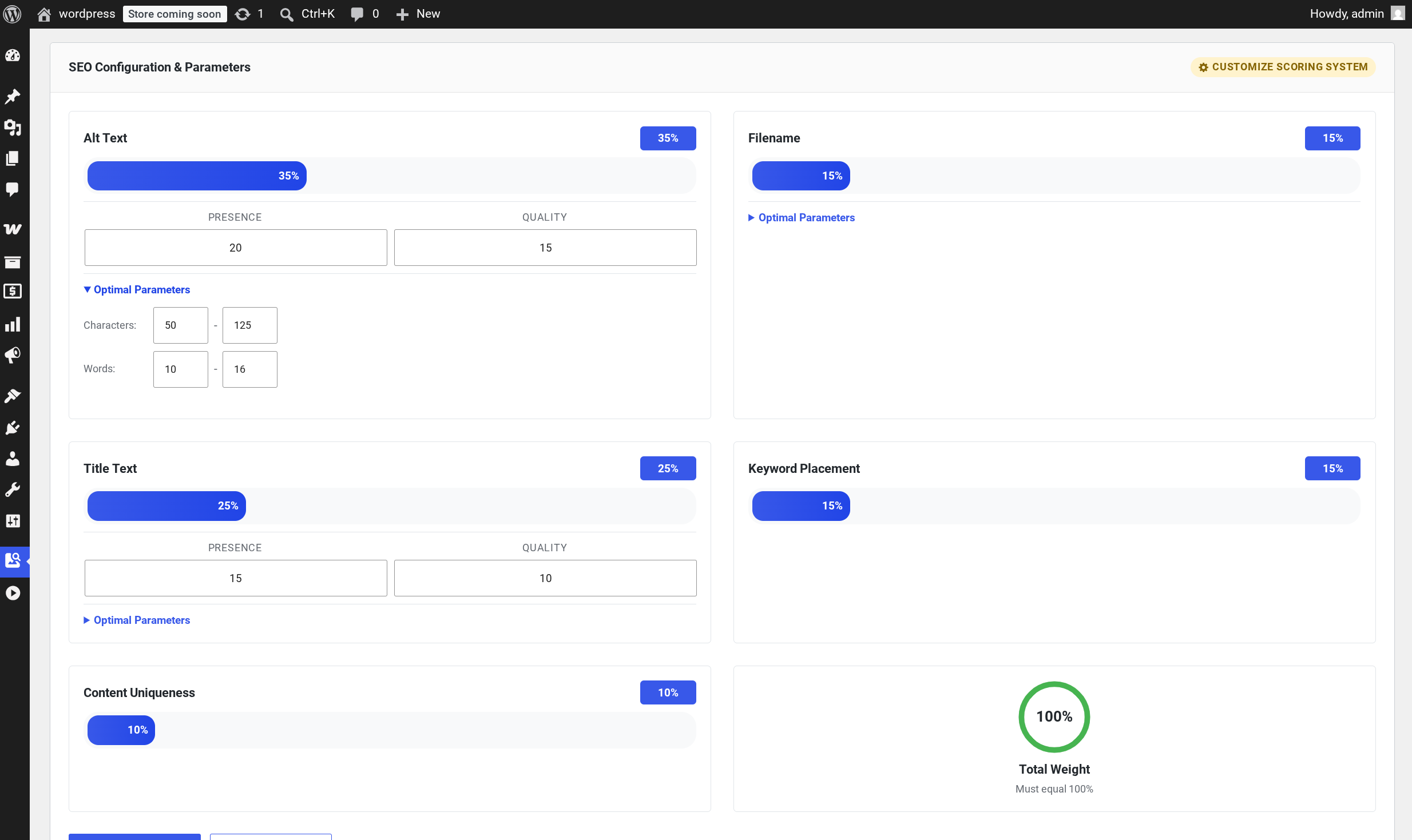
Customizable SEO Scoring Parameters
Tailor the image SEO scoring algorithm to perfectly match your website’s unique needs. This advanced configuration panel lets you adjust global parameter weights and define custom rules for different types of content.
- check_circle Adjust the overall percentage weights for critical factors
- check_circle Fine-tune your scoring criteria by independently valuing the ‘Presence’ versus the ‘Quality’ of your generated metadata.
- check_circle Define your own ‘Optimal Parameters’ for character and word limits to align with specific industry or brand standards.
- check_circle Ensure a perfectly balanced evaluation algorithm with a dynamic tracker that strictly enforces a 100% total weight limit.
Image SEO Best Practices Summary
Key optimization principles based on the latest search engine guidelines
Alt Text (Most Important)
- check_circle Primary ranking factor for Google Images
- check_circle Keep concise: 50-125 characters (10-16 words)
- check_circle Describe images for users, not search engines
- check_circle Include relevant keywords naturally, avoid stuffing
- check_circle Don’t use “image of” or “picture of” prefixes
Filenames
- check_circle Use descriptive, keyword-rich names
- check_circle Optimal: 40-60 characters (3-6 words)
- check_circle Use hyphens to separate words, not underscores
- check_circle Lowercase letters only
- check_circle Avoid generic names (DSC, IMG, image + numbers)
Title Attributes
- check_circle Minimal SEO impact per Google’s John Mueller
- check_circle Use for user experience (tooltip on hover)
- check_circle Keep shorter than alt text: 40-60 characters
- check_circle Don’t duplicate alt text content
- check_circle Optional but recommended for completeness
Technical Best Practices
- check_circle Use consistent URLs for the same image across your site
- check_circle Saves crawl budget and improves indexing efficiency
- check_circle Context matters: surrounding text affects image relevance
- check_circle Write unique alt text for each image’s specific context
- check_circle Avoid common generic descriptions
2025-2026 Updates: Google emphasizes a ‘people-first’ approach — describe images naturally for users while incorporating relevant keywords. The algorithm rewards useful, information-rich content over keyword-stuffed metadata.
Built on Industry-Leading Best Practices
Our optimization strategies follow proven methodologies from the world’s most trusted SEO authorities
Google Search Central
Official image SEO guidelines directly from Google’s Search documentation, ensuring your images meet their quality standards.
Learn More arrow_forwardAhrefs
Research-backed SEO strategies from one of the industry’s leading tools, trusted by marketing professionals worldwide.
Learn More arrow_forwardSemrush
Data-driven optimization techniques from the comprehensive SEO platform used by Fortune 500 companies.
Learn More arrow_forwardGoogle Search Central – Image SEO Best Practices
Updated July 11, 2025
Official guidance on descriptive filenames, alt text as the most important attribute, and avoiding keyword stuffing. Emphasizes describing images for users with a “people-first” approach.
developers.google.com open_in_newGoogle Consistent Image URLs Guidance
May 12, 2025 update
Use the same image URL wherever the same image appears to save crawl budget and improve indexing efficiency.
searchenginejournal.com open_in_newGoogle Shows How To Use Alt Text For SEO
Sep 23, 2024
John Mueller confirms alt text remains crucial even with AI vision. Context-specific alt text helps Google understand why an image is used on a page.
searchenginejournal.com open_in_newAhrefs – Comprehensive On-Page SEO Checklist 2024
Mar 28, 2024
Emphasizes short, descriptive, relevant filenames and alt text. Aligns with Google’s guidance on using appropriate keywords naturally.
ahrefs.com open_in_newSearch Engine Journal – 12 Important Image SEO Tips
Aug 30, 2024
Comprehensive guide covering descriptive filenames, SEO-friendly alt text, and balancing keywords with genuine description. Warns against keyword stuffing.
searchenginejournal.com open_in_newSemrush – What Is Alt Text? Why It Matters & How to Write It
Jul 14, 2025
Detailed guide with SEO and accessibility perspectives. Recommends under 125 characters, being descriptive and specific, including relevant keywords naturally.
semrush.com open_in_newWe don't guess. Every optimization feature is built on verified best practices from Google, Ahrefs, and Semrush, ensuring your images are optimized exactly how search engines expect them to be.
Frequently Asked Questions
Everything you need to know about InfyPress plugins
Start Ranking Higher Today
Start free, upgrade to Pro for unlimited sites and best-in-class AI models